
- Joined
- Sep 24, 2020
- Messages
- 1,132
- Reaction score
- 394
- Name
- James
Beleive it or not, people are becoming more... 'keyboard conscious' these days.
A lot of people can't just settle for whatever random keyboard landed on their desk. In fact, some will hunt down specific keyboard layout bases, add their own specific switches and then their own keycaps.. and then build it up themselves.
I'm not one of those people, but I do like a nice keyboard. I know which parts of the keyboard I can do without, I know what kind of 'feel' I'd like from the keys and therefore I've chosen my keyboard based on those factors.
If you didn't know, there are many different kinds of keyboards, but they tend to boil down into two categories: Membrane or Mechanical.
Membrane: The key you push down will then push into a conductive, dome-shaped membrane which then flattens it, which allows it contact a circuit board underneath and then make the key press.
Mechanical: The key you push down is attached to a switch which engages, in which a conductive stem is pressed down which makes the key press.
There are other types, but these are the most common.
With Mechanical, there are a plethora of options which can make the press feel different. Some have tactile switches inside them which creates a 'bump' effect to happen during the press. And some of them have a loud clicking noise. Some of them feel mushy and quiet though too, so you've got options.
Cherry MX are one of the biggest providers of keyboard switches, and for instance they offer products such as the...
Red - A Linear, non-clicky switch with a smooth press
Blue - A loud, clicky switch with a bump felt in the press
Green - Like a super heavy version of the Blue. For the heavy handed!
Grey - Like a super heavy version of the Red. For the heavy handed, quiet type!
Black - A direct, linear switch with no click and a smooth press. The keys will return super-fast due to a stronger spring.
Brown - Stripped down, linear switch with no click and a smooth press. Made for precision.
They do plenty of others, such as low profile, ultra quiet and laptop sized switches so there are lots of options. There are also other brands of switch makers such as Gateron, Kailh and there are also some bigger brands making their own such as Razer and Logitech.
Anyway,
tl;dr
What keyboard do you have?
I have a Ducky x Varmilo MIYA Pro (Colour: Moonlight)
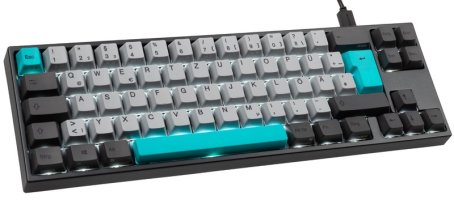
I love it because the colours are my thing, It's got the keys I need (and doesn't have the ones I don't), it's heavy construction and no-frills, USB-C and most importantly has the Cherry MX Black key switches in! I like a strong, straight press that lets me just carry on without a fuss.
It's called a 65% keyboard. Which means the function keys are gone (merged into the number keys), the numpad is gone but the arrow keys are retained.
Ducky and Varmilo are two relatively big keyboard manufacturers, so to find that they collaborated on this one made it an obvious pick for me when I was scouring the webs.
If you don't have a nice keyboard (to your own admission).. are there any that you've had your eye on?
A lot of people can't just settle for whatever random keyboard landed on their desk. In fact, some will hunt down specific keyboard layout bases, add their own specific switches and then their own keycaps.. and then build it up themselves.
I'm not one of those people, but I do like a nice keyboard. I know which parts of the keyboard I can do without, I know what kind of 'feel' I'd like from the keys and therefore I've chosen my keyboard based on those factors.
If you didn't know, there are many different kinds of keyboards, but they tend to boil down into two categories: Membrane or Mechanical.
Membrane: The key you push down will then push into a conductive, dome-shaped membrane which then flattens it, which allows it contact a circuit board underneath and then make the key press.
Mechanical: The key you push down is attached to a switch which engages, in which a conductive stem is pressed down which makes the key press.
There are other types, but these are the most common.
With Mechanical, there are a plethora of options which can make the press feel different. Some have tactile switches inside them which creates a 'bump' effect to happen during the press. And some of them have a loud clicking noise. Some of them feel mushy and quiet though too, so you've got options.
Cherry MX are one of the biggest providers of keyboard switches, and for instance they offer products such as the...
Red - A Linear, non-clicky switch with a smooth press
Blue - A loud, clicky switch with a bump felt in the press
Green - Like a super heavy version of the Blue. For the heavy handed!
Grey - Like a super heavy version of the Red. For the heavy handed, quiet type!
Black - A direct, linear switch with no click and a smooth press. The keys will return super-fast due to a stronger spring.
Brown - Stripped down, linear switch with no click and a smooth press. Made for precision.
They do plenty of others, such as low profile, ultra quiet and laptop sized switches so there are lots of options. There are also other brands of switch makers such as Gateron, Kailh and there are also some bigger brands making their own such as Razer and Logitech.
Anyway,
tl;dr
What keyboard do you have?
I have a Ducky x Varmilo MIYA Pro (Colour: Moonlight)
I love it because the colours are my thing, It's got the keys I need (and doesn't have the ones I don't), it's heavy construction and no-frills, USB-C and most importantly has the Cherry MX Black key switches in! I like a strong, straight press that lets me just carry on without a fuss.
It's called a 65% keyboard. Which means the function keys are gone (merged into the number keys), the numpad is gone but the arrow keys are retained.
Ducky and Varmilo are two relatively big keyboard manufacturers, so to find that they collaborated on this one made it an obvious pick for me when I was scouring the webs.
If you don't have a nice keyboard (to your own admission).. are there any that you've had your eye on?